Hardware Wallets NZ


Your private keys should never touch the internet. A hardware wallet ensures they don't. If you are holding any meaningful amount of crypto long term, this is the standard - not an upgrade.
CNZ recommends Trezor. We do not recommend Ledger. This guide explains why, and covers everything Kiwis need to know about hardware wallet security in 2026.
Recommended Hardware Wallets
Trezor Safe 5
CNZ recommended · From ~NZD $219
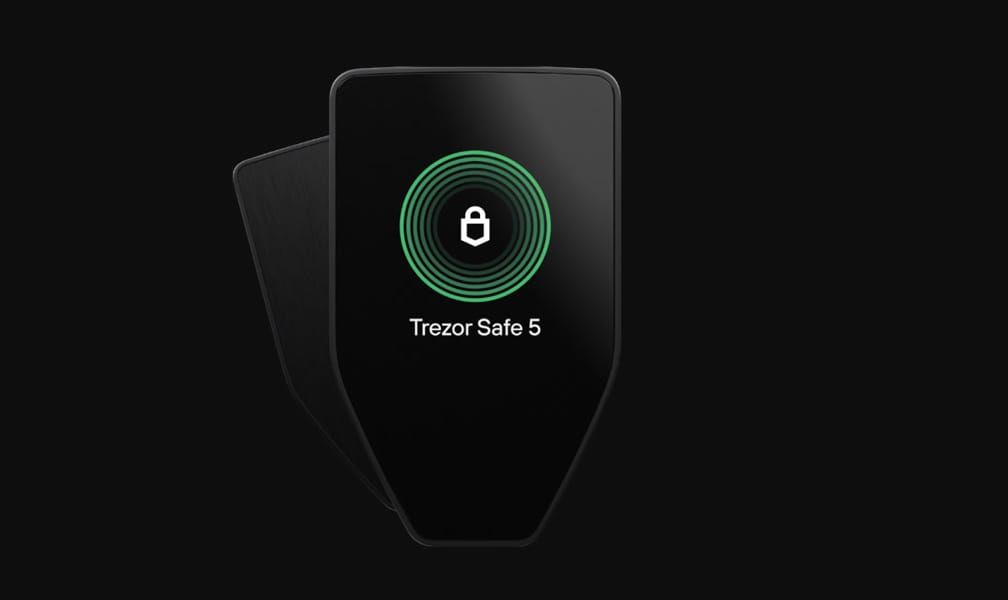
The Trezor Safe 5 is CNZ's recommended mid-range hardware wallet: a colour touchscreen, Secure Element chip, and fully open source firmware. The premium Safe 7 adds Bluetooth, wireless charging, Gorilla Glass, and IP67 waterproofing.
What is a Cryptocurrency Hardware Wallet?
A hardware wallet is a type of crypto wallet that stores your private keys in a secure physical device, such as the multi-coin hardware wallets offered by Trezor. Whenever you make an outbound transaction from a hardware wallet, you're required to physically approve the transaction from your device, via a connection to your PC or mobile.
Your private keys never leave your wallet so they're virtually impossible to be penetrated or infected; hence why hardware wallets are known as the apex of crypto wallet security.
A hardware wallet simply put, is a very basic computer that's been stripped down to the bare necessities. The only capabilities of them are to store your private keys offline and sign transactions offline, making them virtually immune to online hacking attempts.
Pros and Cons of Hardware Wallets
Pros
- Highest Security - Hardware wallets offer the highest level of security for crypto storage.
- Multi-coin Support - Storing all of your assets in one place easily enables users to keep track of and trade or spend your cryptocurrencies.
- Pin Protected - Most hardware wallets enable extra security through a pin or password so your funds cannot be randomly accessed if the hardware is stolen.
Cons
- Price - Hardware wallets can be rather expensive. ($219 - $450+ NZD)
- Replicas - Due to the high price, people naturally attempt to find a cheaper place to purchase, sometimes this results in these people being scammed with 'fake' hardware wallets.
- Limited Accessibility - In order to make a transaction from your hardware wallet you must connect it to your PC or smartphone. Although this increases security, it decreases accessibility (this is easily solved by using both cold storage and hot wallet simultaneously).
Why Hardware Wallets Are The Best Wallets
In the realm of NZ crypto wallet security, hardware wallets such as Trezor are hailed as the apex of safeguarding digital assets. Their fundamental strength lies in their offline operation, ensuring that private keys, (the critical access points to funds), remain untouched by potential online threats. This is why they are called 'cold storage' wallets.
Traditional software (online) wallets often fall prey to malware and phishing attacks, compromising the security of private keys. In contrast, hardware wallets are inherently immune to such threats. These devices execute transactions within the confines of a secure physical environment, keeping private keys isolated from malicious actors.
Tamper-evident packaging is another feature of hardware wallets, ensuring the integrity of the device by alerting users if it has been tampered with or opened. Additionally, these wallets generate a recovery seed phrase during setup, serving as a crucial backup. This seed enables users to restore their funds on a new device in case the original is lost or damaged, emphasizing the importance of secure offline storage for this backup.
Despite their advanced security features, hardware wallets are designed to be user-friendly. Equipped with intuitive interfaces, hardware wallets cater to both beginners and experienced users. Reputable manufacturers also commit to regular firmware updates, addressing potential vulnerabilities and reinforcing security measures.
In summary, the robust security mechanisms, offline operation, and user-friendly design position hardware wallets as the preferred choice for individuals seeking the highest level of security for their cryptocurrency holdings - essential for holding crypto long term.
What are Private Keys?
Private keys in the context of cryptocurrency prove ownership of assets associated with a particular wallet address and allow you to access and spend the assets in that address.
An easy way to understand this is if you think of your wallet as your online banking account, your private key is the login information for your account, allowing you to sign in and spend the funds or do as you wish with them.
Just the same as you want to keep your online banking information safe, you must keep your private keys safe. Otherwise anyone can log-in and access your account or wallet.
Important! You should never disclose your private keys to anyone you don't want to have access to your crypto assets. There are lots of scams in the crypto world and many of them will ask for your private keys, you should treat these as the combination to your safe and never disclose them, no matter how 'legitimate' it may seem.
Each public receiving address (where you receive funds to) has its own corresponding private key, and unlike the public address, the private key enables anyone who knows it to access the address and therefore access the funds inside it.
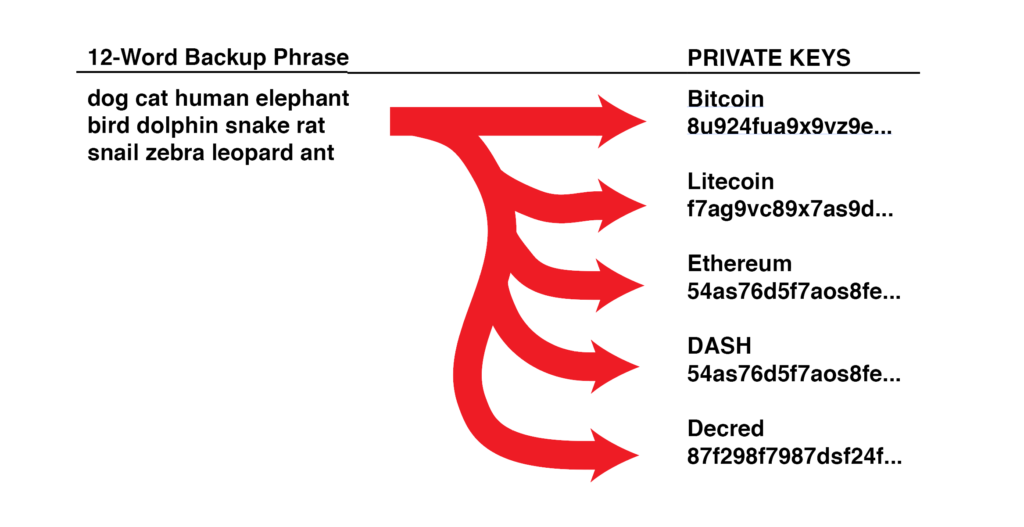
When you first create a wallet, all of your private keys are automatically created using your 12-word seed phrase. When the 12-Word seed is run through a standardised formula, it is turned into a number called a seed integer, this can be thought of as your 'master private key'. An almost endless number of public and private keys can be created when your "master" private key is run through a standardised algorithm.
Hardware Wallet Security Tips
To maximize the security of your crypto assets when using hardware wallets, consider these important tips:
- Buy Direct: Always purchase hardware wallets directly from the manufacturer's official website.
- Backup Seed Phrase: Store your recovery seed phrase in a secure, offline location, preferably in a fireproof and waterproof container.
- Never Share: Never share your private keys or seed phrase with anyone, even if they claim to be from customer support.
- Update Firmware: Regularly update your device's firmware to ensure you have the latest security features.
- Verify Addresses: Always verify receiving addresses on the device screen, not just on your computer.
- Use Strong PINs: Set a strong PIN code for your device to prevent unauthorized access.
- Physical Security: Keep your hardware wallet in a secure location when not in use.
How to Buy a Hardware Wallet in NZ
Buy direct from trezor.io only.
CNZ recommends buying Trezor direct from trezor.io only. No NZ reseller currently stocks Trezor. Be aware that purchasing creates a record of your name and address - for maximum privacy, Monero payment is an option on the official Trezor store.
Trezor vs Ledger - CNZ's Position
CNZ recommends Trezor and does not recommend Ledger. Here is why.
Trezor
Ease of use: The Trezor Safe 5 features a colour touchscreen making it one of the most beginner-friendly hardware wallets available. The premium Safe 7 adds Bluetooth, wireless charging, Gorilla Glass, and IP67 waterproofing.
Open source: Fully open source - firmware, hardware designs, and the TROPIC01 Secure Element chip are all publicly auditable. Anyone can inspect and verify the code. This is Trezor's defining advantage.
Connectivity: Safe 7 supports Bluetooth and full iOS/Android connectivity. Safe 5 connects via USB.
Supported coins: 8,000+ coins and tokens across major networks including Bitcoin, Ethereum, and Solana.
Price: Safe 5 approximately NZD $219. Safe 7 approximately NZD $410-450.
Why CNZ does not recommend Ledger
Ledger has experienced serious security and trust failures that CNZ cannot overlook:
- 2020 customer database breach: Ledger's customer database was hacked, exposing the real names, email addresses, and home addresses of over 270,000 customers. This data was published publicly online.
- The consequences were severe and ongoing: customers received targeted phishing emails, physical mail scams sent to their home addresses, and phone calls from attackers using their real names. Some received physical threats. The data remains in circulation.
- Ledger Recover controversy (2023): Ledger launched an optional service allowing seed phrases to be backed up with third parties. The backlash was severe - it revealed that Ledger's architecture is capable of extracting your seed phrase from the device. This directly contradicts the fundamental promise of a hardware wallet. Ledger framed it as optional but the architectural implication cannot be undone.
- 2023 Connect Kit supply-chain attack: Ledger's software was compromised in a supply-chain attack affecting dApps built on Ledger's infrastructure.
- 2026 data breach: A second customer data leak occurred in early 2026 via third-party partner Global-e, again exposing order data including names and addresses. The pattern of data exposure continues.
- Firmware support discontinued on older models: The original Ledger Nano S no longer receives firmware updates, security patches, or new app support. Users on older hardware are left with unpatched vulnerabilities and incompatibility with newer blockchains. Trezor maintains firmware support for older devices significantly longer and their open source nature allows community patches even if official support ends.
- Closed source Secure Element: Ledger's core security chip firmware is proprietary and cannot be independently audited. You are trusting Ledger's word on its security - not verifiable code.
If you already own a Ledger, it is not necessarily compromised - the device itself has not been cracked in widespread use. But CNZ will not recommend a company that exposed its customers' home addresses to the public internet, launched a service that revealed seed phrase extraction is architecturally possible, and discontinued firmware support on older hardware.
If you buy a Ledger despite this, use a delivery address that cannot be linked to your home and be extremely vigilant about phishing.