
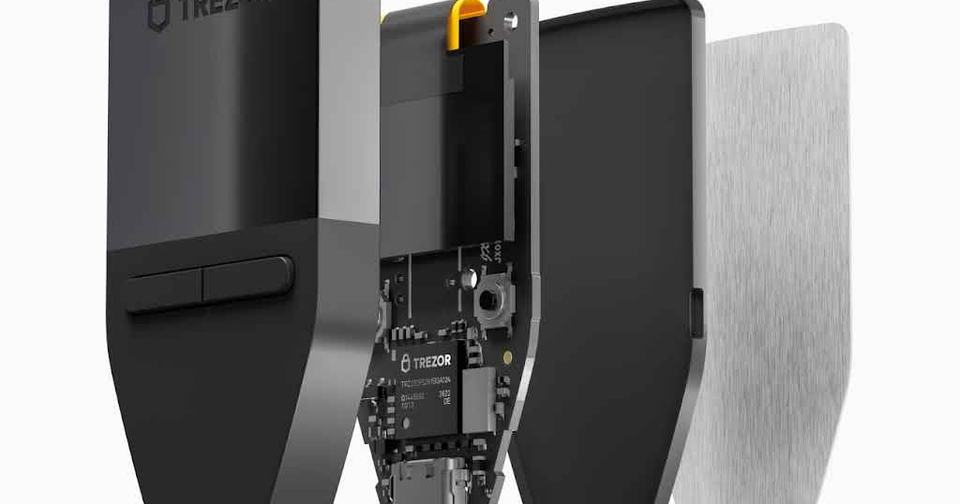
Trezor created the hardware wallet category in 2014. Over a decade later, the Czech company continues to evolve with the Safe 3, Safe 5, and newly announced Safe 7. For New Zealanders holding Bitcoin, Ethereum, or thousands of other cryptocurrencies, Trezor remains one of the most established options for self-custody.
What Makes Trezor Different?
Open-Source Transparency: Trezor publishes all firmware code publicly. Independent security researchers can audit every line. When flaws exist, they become public knowledge—but they also get fixed.
Pioneer Status: Trezor invented the hardware wallet. PIN protection, passphrase support, and recovery seed backups all originated here. The brand carries significant weight in the Bitcoin community.
Three-Tier Strategy:
- Safe 3: Budget-friendly secure element protection
- Safe 5: Premium touchscreen experience
- Safe 7: Wireless connectivity and quantum-ready security

How Trezor Works: Security Architecture Explained
Trezor devices operate on a straightforward principle. Your private keys never leave the device. When you want to send cryptocurrency, your computer or phone creates an unsigned transaction and sends it to the Trezor. The device signs the transaction internally using your private keys, then sends the signed transaction back to your computer for broadcast to the blockchain.
The Safe 3, Safe 5, and Safe 7 all incorporate an EAL6+ certified Secure Element chip. This specialized hardware component stores your private keys in tamper-resistant memory that physically destroys itself if someone attempts to extract data through voltage manipulation or other physical attacks. This represents a major security upgrade from the older Model One and Model T, which used general-purpose microcontrollers vulnerable to sophisticated physical attacks.
The security model relies on multiple layers. Your PIN protects against casual theft. Your recovery seed allows wallet restoration if the device is lost or damaged. An optional passphrase acts as a "25th word" that creates entirely separate wallets, providing plausible deniability if you're forced to unlock your device under duress.
Trezor Suite, the companion software, runs on your computer or phone and provides the interface for managing your assets. The software is open-source and available for Windows, macOS, Linux, and Android. iOS support exists, but with significant limitations on the Safe 3 and Safe 5 models.
Trezor Safe 3 vs Safe 5 vs Safe 7: Choosing Your Model
TLDR
Safe 3: Core security at the lowest price. Dated interface but effective. Best for budget-conscious users who don't need iOS support.
Safe 5: Better user experience with color touchscreen and haptic feedback. Faster transaction verification. Premium buys convenience, not additional security.
Safe 7: Cutting-edge features for premium price. Bluetooth connectivity, quantum-ready architecture, full iOS support. Most users don't need this.
Trezor's current lineup spans three price points with distinct feature sets.

The Safe 3 delivers the core security features at the lowest price point. The monochrome display and button navigation feel dated compared to touchscreen competitors, but the device performs its primary function effectively. For users who prioritize security over user experience and don't need iOS support, the Safe 3 represents excellent value.
The Safe 5 improves the user experience significantly with its color touchscreen and haptic feedback. Transaction verification becomes faster and less error-prone. The larger display makes it easier to verify addresses and transaction details. The premium over the Safe 3 buys convenience, not additional security.
The Safe 7 targets users who want cutting-edge features and are willing to pay for them. Bluetooth connectivity eliminates cables, though this introduces new attack vectors that some security purists will reject on principle. The quantum-ready architecture prepares for future cryptographic threats, though practical quantum attacks on current cryptocurrencies remain years away. Full iOS support makes it the only Trezor that works properly with iPhones.

Who Should Choose Trezor?
Trezor serves specific user profiles well while being less suitable for others.
Perfect For: Users who prioritize open-source transparency over convenience will find Trezor's fully auditable firmware essential. If you need to verify exactly what code is running on your device, Trezor and a handful of competitors are your only options.
Cryptocurrency holders with diverse portfolios benefit from Trezor's broad coin support. The device handles Bitcoin, Ethereum, and thousands of other assets through a single interface, eliminating the need for multiple hardware wallets.
Long-term holders who rarely transact can tolerate Trezor's less polished user experience in exchange for proven security. If you're buying and holding for years, the occasional interaction with Trezor Suite is manageable.
Advanced users who want features like multi-signature wallets, coin control, and custom derivation paths will appreciate Trezor Suite's comprehensive functionality. The software exposes advanced options without requiring command-line tools.
Consider Alternatives If: Beginners seeking the simplest possible experience should look at Tangem's card-based wallets. The tap-to-sign workflow is significantly more intuitive than Trezor's button navigation or touchscreen interface.iPhone users will find the Safe 3 and Safe 5 frustrating due to limited iOS support. Only the Safe 7 offers full iOS compatibility, and its premium price may not justify the convenience.
Budget-conscious users can get comparable security from Tangem at half the price of a Safe 3. The lack of a screen is a trade-off, but one many users find acceptable.
Users who demand the absolute highest security for large Bitcoin holdings should consider Coldcard or Blockstream Jade. Both offer air-gapped operation and features specifically designed for paranoid security models.

Real-World Performance and User Experience
Daily use of Trezor devices reveals both strengths and frustrations. The Safe 3's two-button navigation feels dated in 2025. Scrolling through long addresses or transaction details requires patience. The monochrome display is functional but lacks the clarity of modern color screens. For users who transact frequently, these limitations become tedious.
The Safe 5 improves the experience significantly. The color touchscreen makes address verification faster and less error-prone. Haptic feedback provides confidence that the device registered your input. Transaction signing takes seconds rather than the minute-plus required on the Safe 3. For users who interact with their hardware wallet regularly, the premium over the Safe 3 is justified.
Trezor Suite software performs adequately but lacks polish. The interface handles basic operations smoothly, but advanced features hide behind multiple menu layers. Portfolio tracking is basic compared to software wallets. The desktop app occasionally requires reconnecting the device when switching between accounts. These are minor annoyances rather than dealbreakers, but they accumulate over time.
Connection reliability varies by platform. Windows and macOS users generally experience smooth operation. Linux users may need to configure udev rules for proper device detection. Android works well, though some phones have inconsistent USB-C connections. iOS users with Safe 3 or Safe 5 face significant limitations, as the Trezor Suite Lite app only allows viewing balances and receiving funds, not sending transactions.
Firmware updates occur regularly, typically every few months. The update process is straightforward but requires reconnecting the device and entering your PIN multiple times. Updates occasionally introduce bugs that subsequent releases fix. This is the reality of actively developed open-source software.
Potential Drawbacks and Considerations
No hardware wallet is perfect, and Trezor has several limitations worth understanding before purchase.
The Model One and Model T Vulnerability: Trezor continues selling the Model One and Model T despite their unfixable vulnerability to voltage glitching attacks. An attacker with physical access and basic equipment can extract seeds from these devices. Trezor has not issued recalls or adequately warned users. This represents a significant ethical failure. If you own a Model One or Model T, consider upgrading to a Safe series device or switching to a competitor with secure element protection.
Limited iOS Support: The Safe 3 and Safe 5 only support viewing balances and receiving funds on iOS devices. You cannot send transactions from an iPhone without also using a computer. This limitation stems from Apple's restrictions on USB accessories, but it remains frustrating for iPhone users. Only the $249 Safe 7 offers full iOS support, forcing iPhone users to either pay a significant premium or use Android/desktop.Plastic Construction: The Safe 3 and Safe 5 use plastic bodies that feel less premium than competitors' metal construction. The devices are functional but don't inspire the same confidence as Coldcard's metal case or Tangem's bank-card durability. For a device meant to secure potentially life-changing amounts of wealth, the plastic construction feels like a cost-cutting measure.
Supply-Chain Risk: While the Safe series uses secure elements, the two-chip architecture (secure element plus general-purpose microcontroller) remains theoretically vulnerable to sophisticated supply-chain attacks. Ledger's 2025 disclosure highlighted this limitation. For most users, this risk is theoretical. For high-value targets, it's a legitimate concern that may justify choosing a fully air-gapped device like Coldcard or Jade.
Data Breach History: Trezor has experienced multiple breaches of third-party services that exposed customer information. While these didn't compromise device security, they enabled targeted phishing attacks. Users must remain vigilant about verifying communications and never entering recovery seeds into software, regardless of how legitimate the request appears.
Discontinued Coin Support: Trezor's February 2025 decision to drop support for Dash, Bitcoin Gold, DigiByte, Namecoin, and Vertcoin demonstrates that coin support is not permanent. Users holding niche cryptocurrencies should verify ongoing support before purchasing.
The Verdict: Proven Security with Room for Improvement
Trezor remains a solid choice for cryptocurrency self-custody in 2025, particularly for users who value open-source transparency and broad coin support. The Safe 3 delivers secure element protection at an accessible price point, while the Safe 5 offers a significantly better user experience for those willing to pay more. The Safe 7 pushes into premium territory with features that most users don't need.
The company's track record of responding to security vulnerabilities and maintaining products for over a decade provides confidence in long-term support. The open-source firmware allows independent verification of security claims, a feature that matters deeply to privacy-focused users.
For New Zealanders seeking secure cryptocurrency storage, Trezor Safe 3 or Safe 5 represent reasonable choices. Buy directly from Trezor.io to ensure authenticity. Set a strong PIN and passphrase. Keep your recovery seed offline in a secure location. Update firmware when prompted. Follow these practices, and your Trezor will serve you well.